Blurred Rounded UIView
Maps and Apple Music apps in iOS 10 include a brand new way to present modal contents: a floating semi-modal view. Widgets and notifications have been redesigned to be presented with a similar shape.
Due to beta developer agreement I cannot share screenshots of those features. However you can have a look at them visiting the dedicated iOS 10 preview page on Apple’s website.
Unfortunately the technique used in iOS 8 and 9 to round the corner won’t work anymore: you’ll end up with rounded corners and a transparent background instead.
There’s an entire thread on Apple’s Developer Forums with motivations behind this change (you need to register as developer to read it).
However the trick is to avoid using layer.mask on the view that contains the UIVisualEffectView as subview or on the UIVisualEffectView itself as we used to do. Instead you are supposed to use layer.maskView or, if you just need rounded corners, the layer.cornerRadius property associated with layer.masksToBounds = true.
I’ve also found that if you try to add an external shadow to the container view’s layer, you’ll end up without blur. The trick is to set the shadow inside func layoutSubiviews() override method.
class BlurredRoundedView: UIView {
    let effectBackground = UIVisualEffectView(effect: extraLightBlur)

    required init?(coder aDecoder: NSCoder) {
        super.init(coder: aDecoder)
        commonInit()
    }

    override init(frame: CGRect) {
        super.init(frame: frame)
        commonInit()
    }

    func commonInit()  {
        initLayer()
        initEffectView()
    }

    func initLayer() {
        backgroundColor = UIColor.clearColor()
        layer.cornerRadius = cornerRadius
        layer.masksToBounds = false
    }

    func initEffectView() {
        effectBackground.frame = bounds
        effectBackground.layer.cornerRadius = cornerRadius
        effectBackground.layer.masksToBounds = true

        addSubview(effectBackground)
        sendSubviewToBack(effectBackground)
    }

    override func layoutSubviews() {
        super.layoutSubviews()
        let shadowPath = UIBezierPath(roundedRect: bounds, cornerRadius: cornerRadius)
        layer.masksToBounds = false
        layer.shadowColor = UIColor.lightGrayColor().CGColor
        layer.shadowOffset = CGSizeMake(0.0, 0.0)
        layer.shadowOpacity = 0.4
        layer.shadowRadius = 4
        layer.shadowPath = shadowPath.CGPath
    }
}
I’ve prepared an Xcode playground to show the final result.
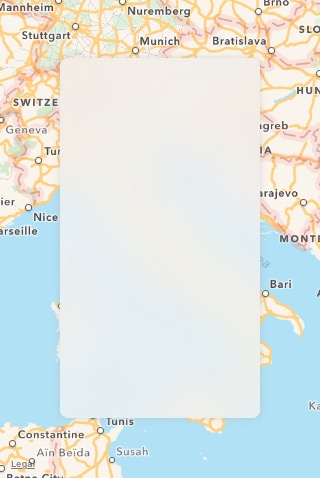
Once you know how to achieve the desired result, it’s really simple. Enjoy.